b3245aba9b
The signedness calculated along with the RAM value scale and offset was
incorrectly applied to the info frame value. This caused some values to
be interpreted as unsigned instead of signed leading to negative values
reporting as very large positive values.

Inverter GUI




The invertergui allows the monitoring of a Victron Multiplus via the MK3/MK2 USB or the MK2 RS232.
The ghcr.io/diebietse/invertergui docker image is a build of this repository.
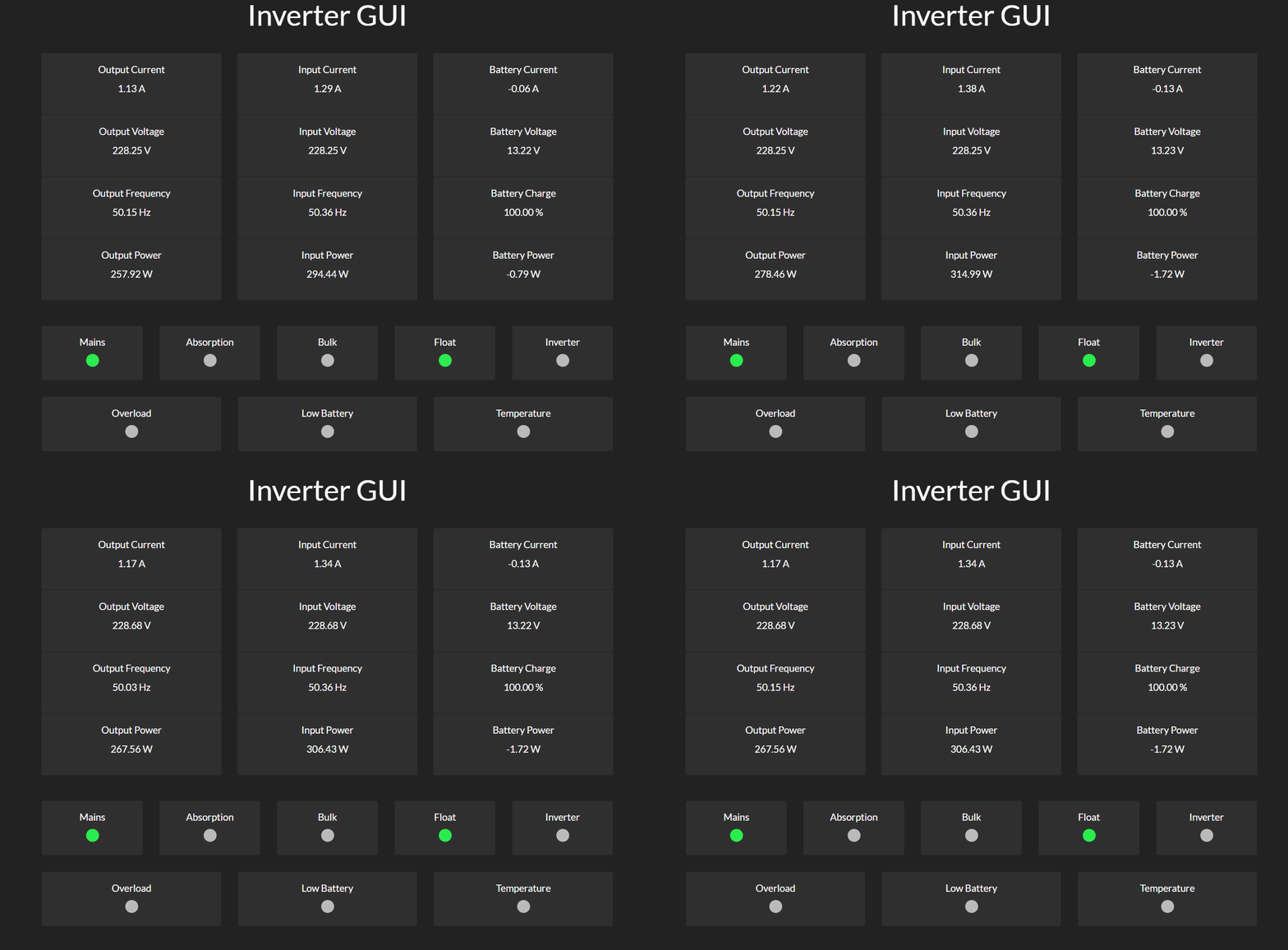
Demo
Quick Start
docker run --name invertergui --device /dev/ttyUSB0:/dev/ttyUSB0 -p 8080:8080 ghcr.io/diebietse/invertergui
Requirements
This project makes use of Go Modules. The minimum version for Go is 1.16
Getting started
Usage:
  invertergui [OPTIONS]

Application Options:
      --address=        The IP/DNS and port of the machine that the application is running on. (default: :8080) [$ADDRESS]
      --data.source=    Set the source of data for the inverter gui. "serial", "tcp" or "mock" (default: serial) [$DATA_SOURCE]
      --data.host=      Host to connect when source is set to tcp. (default: localhost:8139) [$DATA_HOST]
      --data.device=    TTY device to use when source is set to serial. (default: /dev/ttyUSB0) [$DATA_DEVICE]
      --cli.enabled     Enable CLI output. [$CLI_ENABLED]
      --mqtt.enabled    Enable MQTT publishing. [$MQTT_ENABLED]
      --mqtt.broker=    Set the host port and scheme of the MQTT broker. (default: tcp://localhost:1883) [$MQTT_BROKER]
      --mqtt.client_id= Set the client ID for the MQTT connection. (default: interter-gui) [$MQTT_CLIENT_ID]
      --mqtt.topic=     Set the MQTT topic updates published to. (default: invertergui/updates) [$MQTT_TOPIC]
      --mqtt.username=  Set the MQTT username [$MQTT_USERNAME]
      --mqtt.password=  Set the MQTT password [$MQTT_PASSWORD]
      --loglevel=       The log level to generate logs at. ("panic", "fatal", "error", "warn", "info", "debug", "trace") (default: info) [$LOGLEVEL]

Help Options:
  -h, --help            Show this help message
Port 8080
The default HTTP server port is hosted on port 8080. This exposes the HTTP server that hosts the:
- Web GUI
- Munin Plugin
- Prometheus Monitor
Web GUI
The GUI location is at the root (http://localhost:8080/) of the HTTP server.
Example output:
Date: Mon, 17 Dec 2018 18:14:51 +0000
LEDs:
Mains
Float
Output Current: 1.580 A
Output Voltage: 227.830 V
Output Frequency: 50.026 Hz
Output Power: 359.971 VA
Input Current: 1.750 A
Input Voltage: 227.830 V
Input Frequency: 50.103 Hz
Input Power: 398.703 VA
Input - Output Power: 38.731 VA

Battery Current: -0.050 A
Battery Voltage: 13.170 V
Battery Power: -0.659 W
Battery Charge: 100.000 %
Munin
The Munin plugin location is at /munin (http://localhost:8080/munin).
Example output:
multigraph in_batvolt
volt.value 13.154
multigraph in_batcharge
charge.value 100.000
multigraph in_batcurrent
current.value -0.092
multigraph in_batpower
power.value -1.209
multigraph in_mainscurrent
currentin.value 1.860
currentout.value 1.676
multigraph in_mainsvoltage
voltagein.value 225.786
voltageout.value 225.786
multigraph in_mainspower
powerin.value 419.945
powerout.value 378.372
multigraph in_mainsfreq
freqin.value 50.361
freqout.value 50.026
Prometheus
The Prometheus endpoint is at the default /metrics path (http://localhost:8080/metrics).
Sample Prometheus yaml entry:
- job_name: "victron"
  static_configs:
    - targets: ["localhost:8080"]
The metrics that are tracked:
# HELP battery_charge_percentage Remaining battery charge.
# TYPE battery_charge_percentage gauge
battery_charge_percentage 100
# HELP battery_current_a Battery current.
# TYPE battery_current_a gauge
battery_current_a -0.06
# HELP battery_power_w Battery power.
# TYPE battery_power_w gauge
battery_power_w -0.7896
# HELP battery_voltage_v Voltage of the battery.
# TYPE battery_voltage_v gauge
battery_voltage_v 13.16
# HELP go_gc_duration_seconds A summary of the GC invocation durations.
# TYPE go_gc_duration_seconds summary
go_gc_duration_seconds{quantile="0"} 5.3183e-05
go_gc_duration_seconds{quantile="0.25"} 0.000116
go_gc_duration_seconds{quantile="0.5"} 0.000156305
go_gc_duration_seconds{quantile="0.75"} 0.000313721
go_gc_duration_seconds{quantile="1"} 0.044886879
go_gc_duration_seconds_sum 0.394171418
go_gc_duration_seconds_count 58
# HELP go_goroutines Number of goroutines that currently exist.
# TYPE go_goroutines gauge
go_goroutines 8
# HELP go_info Information about the Go environment.
# TYPE go_info gauge
go_info{version="go1.11.3"} 1
# HELP go_memstats_alloc_bytes Number of bytes allocated and still in use.
# TYPE go_memstats_alloc_bytes gauge
go_memstats_alloc_bytes 3.21496e+06
# HELP go_memstats_alloc_bytes_total Total number of bytes allocated, even if freed.
# TYPE go_memstats_alloc_bytes_total counter
go_memstats_alloc_bytes_total 1.7361072e+08
# HELP go_memstats_buck_hash_sys_bytes Number of bytes used by the profiling bucket hash table.
# TYPE go_memstats_buck_hash_sys_bytes gauge
go_memstats_buck_hash_sys_bytes 1.451092e+06
# HELP go_memstats_frees_total Total number of frees.
# TYPE go_memstats_frees_total counter
go_memstats_frees_total 263807
# HELP go_memstats_gc_cpu_fraction The fraction of this program's available CPU time used by the GC since the program started.
# TYPE go_memstats_gc_cpu_fraction gauge
go_memstats_gc_cpu_fraction 0.00018297252897512647
# HELP go_memstats_gc_sys_bytes Number of bytes used for garbage collection system metadata.
# TYPE go_memstats_gc_sys_bytes gauge
go_memstats_gc_sys_bytes 2.37568e+06
# HELP go_memstats_heap_alloc_bytes Number of heap bytes allocated and still in use.
# TYPE go_memstats_heap_alloc_bytes gauge
go_memstats_heap_alloc_bytes 3.21496e+06
# HELP go_memstats_heap_idle_bytes Number of heap bytes waiting to be used.
# TYPE go_memstats_heap_idle_bytes gauge
go_memstats_heap_idle_bytes 6.2537728e+07
# HELP go_memstats_heap_inuse_bytes Number of heap bytes that are in use.
# TYPE go_memstats_heap_inuse_bytes gauge
go_memstats_heap_inuse_bytes 3.981312e+06
# HELP go_memstats_heap_objects Number of allocated objects.
# TYPE go_memstats_heap_objects gauge
go_memstats_heap_objects 5588
# HELP go_memstats_heap_released_bytes Number of heap bytes released to OS.
# TYPE go_memstats_heap_released_bytes gauge
go_memstats_heap_released_bytes 0
# HELP go_memstats_heap_sys_bytes Number of heap bytes obtained from system.
# TYPE go_memstats_heap_sys_bytes gauge
go_memstats_heap_sys_bytes 6.651904e+07
# HELP go_memstats_last_gc_time_seconds Number of seconds since 1970 of last garbage collection.
# TYPE go_memstats_last_gc_time_seconds gauge
go_memstats_last_gc_time_seconds 1.5450709952576678e+09
# HELP go_memstats_lookups_total Total number of pointer lookups.
# TYPE go_memstats_lookups_total counter
go_memstats_lookups_total 0
# HELP go_memstats_mallocs_total Total number of mallocs.
# TYPE go_memstats_mallocs_total counter
go_memstats_mallocs_total 269395
# HELP go_memstats_mcache_inuse_bytes Number of bytes in use by mcache structures.
# TYPE go_memstats_mcache_inuse_bytes gauge
go_memstats_mcache_inuse_bytes 3456
# HELP go_memstats_mcache_sys_bytes Number of bytes used for mcache structures obtained from system.
# TYPE go_memstats_mcache_sys_bytes gauge
go_memstats_mcache_sys_bytes 16384
# HELP go_memstats_mspan_inuse_bytes Number of bytes in use by mspan structures.
# TYPE go_memstats_mspan_inuse_bytes gauge
go_memstats_mspan_inuse_bytes 27208
# HELP go_memstats_mspan_sys_bytes Number of bytes used for mspan structures obtained from system.
# TYPE go_memstats_mspan_sys_bytes gauge
go_memstats_mspan_sys_bytes 32768
# HELP go_memstats_next_gc_bytes Number of heap bytes when next garbage collection will take place.
# TYPE go_memstats_next_gc_bytes gauge
go_memstats_next_gc_bytes 4.194304e+06
# HELP go_memstats_other_sys_bytes Number of bytes used for other system allocations.
# TYPE go_memstats_other_sys_bytes gauge
go_memstats_other_sys_bytes 775332
# HELP go_memstats_stack_inuse_bytes Number of bytes in use by the stack allocator.
# TYPE go_memstats_stack_inuse_bytes gauge
go_memstats_stack_inuse_bytes 589824
# HELP go_memstats_stack_sys_bytes Number of bytes obtained from system for stack allocator.
# TYPE go_memstats_stack_sys_bytes gauge
go_memstats_stack_sys_bytes 589824
# HELP go_memstats_sys_bytes Number of bytes obtained from system.
# TYPE go_memstats_sys_bytes gauge
go_memstats_sys_bytes 7.176012e+07
# HELP go_threads Number of OS threads created.
# TYPE go_threads gauge
go_threads 10
# HELP mains_current_in_a Mains current flowing into inverter
# TYPE mains_current_in_a gauge
mains_current_in_a 2.17
# HELP mains_current_out_a Mains current flowing out of inverter
# TYPE mains_current_out_a gauge
mains_current_out_a 2
# HELP mains_freq_in_hz Mains frequency at inverter input
# TYPE mains_freq_in_hz gauge
mains_freq_in_hz 50.36082474226804
# HELP mains_freq_out_hz Mains frequency at inverter output
# TYPE mains_freq_out_hz gauge
mains_freq_out_hz 50.153452685421996
# HELP mains_power_in_va Mains power in
# TYPE mains_power_in_va gauge
mains_power_in_va 491.6352
# HELP mains_power_out_va Mains power out
# TYPE mains_power_out_va gauge
mains_power_out_va 453.12
# HELP mains_voltage_in_v Mains voltage at input of inverter
# TYPE mains_voltage_in_v gauge
mains_voltage_in_v 226.56
# HELP mains_voltage_out_v Mains voltage at output of inverter
# TYPE mains_voltage_out_v gauge
mains_voltage_out_v 226.56
# HELP process_cpu_seconds_total Total user and system CPU time spent in seconds.
# TYPE process_cpu_seconds_total counter
process_cpu_seconds_total 39.73
# HELP process_max_fds Maximum number of open file descriptors.
# TYPE process_max_fds gauge
process_max_fds 1.048576e+06
# HELP process_open_fds Number of open file descriptors.
# TYPE process_open_fds gauge
process_open_fds 8
# HELP process_resident_memory_bytes Resident memory size in bytes.
# TYPE process_resident_memory_bytes gauge
process_resident_memory_bytes 1.2742656e+07
# HELP process_start_time_seconds Start time of the process since unix epoch in seconds.
# TYPE process_start_time_seconds gauge
process_start_time_seconds 1.54506833485e+09
# HELP process_virtual_memory_bytes Virtual memory size in bytes.
# TYPE process_virtual_memory_bytes gauge
process_virtual_memory_bytes 1.15101696e+08
MQTT
The MQTT client will publish updates to the given broker at the set topic.
MQTT Configuration Options
--mqtt.enabled    Enable MQTT publishing. [$MQTT_ENABLED]
--mqtt.broker=    Set the host port and scheme of the MQTT broker. (default: tcp://localhost:1883) [$MQTT_BROKER]
--mqtt.client_id= Set the client ID for the MQTT connection. (default: interter-gui) [$MQTT_CLIENT_ID]
--mqtt.topic=     Set the MQTT topic updates published to. (default: invertergui/updates) [$MQTT_TOPIC]
--mqtt.username=  Set the MQTT username [$MQTT_USERNAME]
--mqtt.password=  Set the MQTT password [$MQTT_PASSWORD]
The MQTT client can be enabled by setting the environment variable MQTT_ENABLED=true or flag --mqtt.enabled.
All MQTT configuration can be done via flags or as environment variables.
The URI for the broker can be configured format should be scheme://host:port, where "scheme" is one of "tcp", "ssl", or "ws".
TTY Device
The intertergui application makes use of a serial tty device to monitor the Multiplus.
Example
-dev=/dev/ttyUSB0
Nginx Proxy
The following configuration works for Nginx to allow the invertergui to be proxied.
When using a stand HTTP or HTTPS port to expose the gui:
	location /invertergui {
		return 302 /invertergui/;
	}

	location /invertergui/ {
		proxy_pass http://localhost:8080/;
		proxy_set_header Host $host;
	}

	location /invertergui/ws {
		proxy_pass http://localhost:8080/ws;
		proxy_http_version 1.1;
		proxy_set_header Upgrade $http_upgrade;

		proxy_set_header Connection "upgrade";
		proxy_read_timeout 86400;
		proxy_set_header Host $host;

		proxy_set_header Referer $http_referer;
		proxy_set_header X-Forwarded-For $remote_addr;
		proxy_set_header X-Forwarded-Proto $scheme;
		proxy_set_header X-Forwarded-Port $server_port;
	}
When using a non-stand HTTP or HTTPS port to expose the gui change the HTTP Host description:
proxy_set_header Host $host:$server_port;
The last four lines are optional, but is useful when debugging and logging connections:
		proxy_set_header Referer $http_referer;
		proxy_set_header X-Forwarded-For $remote_addr;
		proxy_set_header X-Forwarded-Proto $scheme;
		proxy_set_header X-Forwarded-Port $server_port;
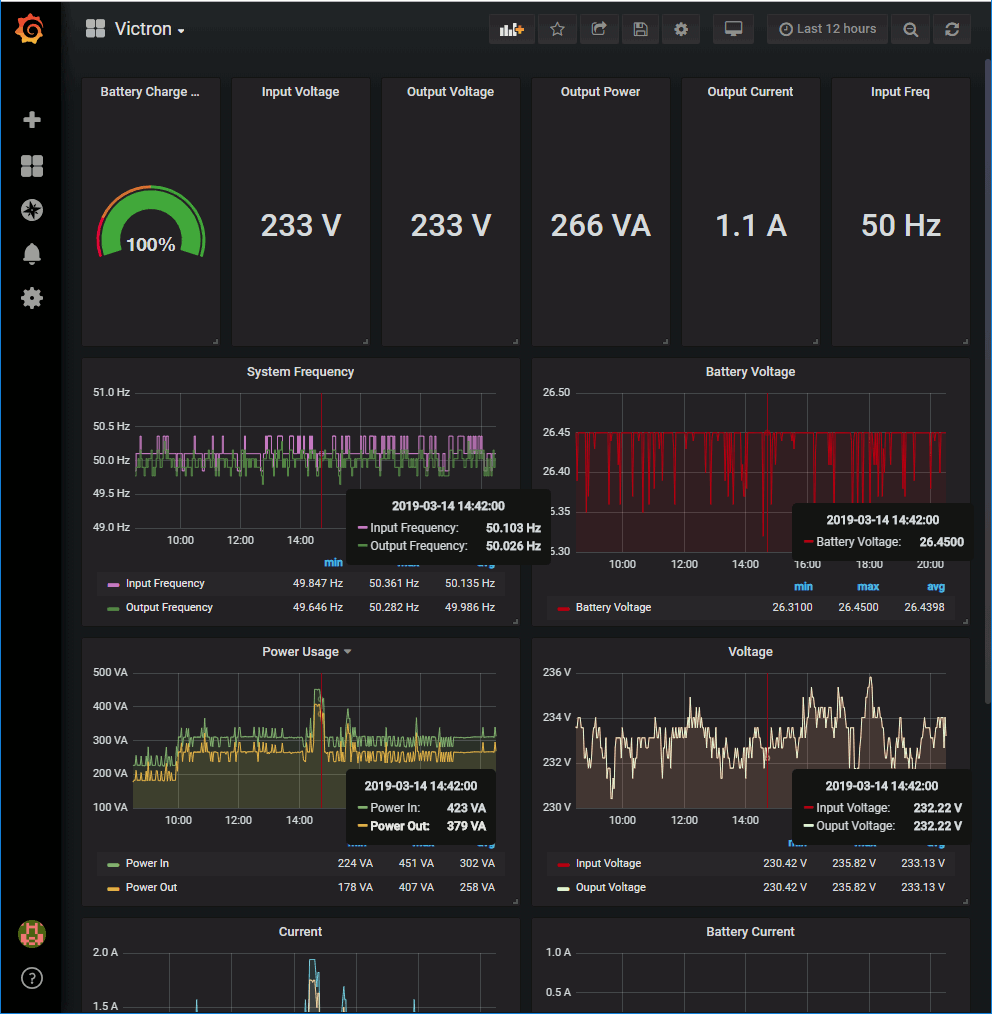
Grafana
This repos includes a Grafana dashboard in the grafana folder that you can import. This is useful if you are using prometheus to log your data and want to display it in a nice way.